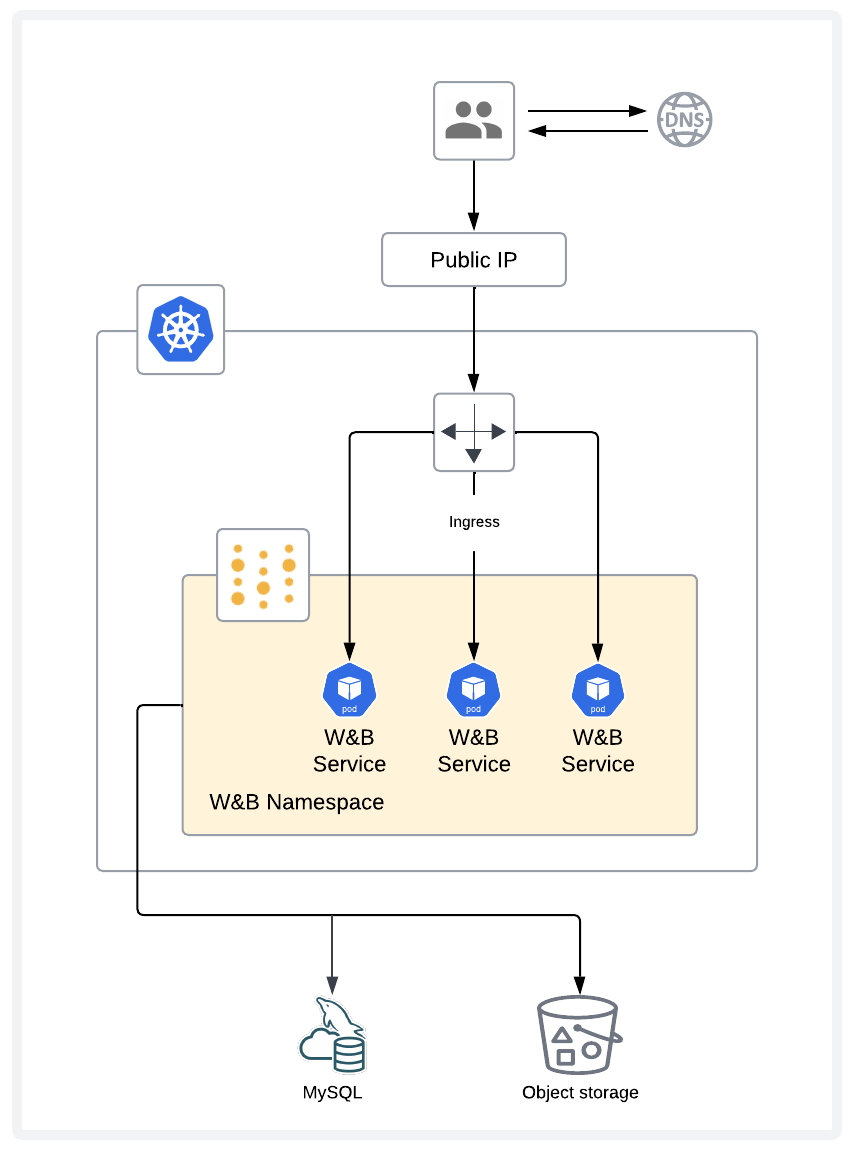
This page describes a reference architecture for a W&B deployment and outlines the recommended infrastructure and resources to support a production deployment of the platform.
Depending on your chosen deployment environment for W&B, various services can help to enhance the resiliency of your deployment.
For instance, major cloud providers offer robust managed database services which help to reduce the complexity of database configuration, maintenance, high availability, and resilience.
This reference architecture addresses some common deployment scenarios and shows how you can integrate your W&B deployment with cloud vendor services for optimal performance and reliability.
Before you start
Running any application in production comes with its own set of challenges, and W&B is no exception. While we aim to streamline the process, certain complexities may arise depending on your unique architecture and design decisions. Typically, managing a production deployment involves overseeing various components, including hardware, operating systems, networking, storage, security, the W&B platform itself, and other dependencies. This responsibility extends to both the initial setup of the environment and its ongoing maintenance.
Consider carefully whether a Self-Managed approach with W&B is suitable for your team and specific requirements.
A strong understanding of how to run and maintain production-grade application is an important prerequisite before you deploy Self-Managed W&B. If your team needs assistance, our Professional Services team and partners offer support for implementation and optimization.
To learn more about managed solutions for running W&B instead of managing it yourself, refer to W&B Multi-tenant Cloud and W&B Dedicated Cloud.
Infrastructure
Application layer
The application layer consists of a multi-node Kubernetes cluster, with resilience against node failures. The Kubernetes cluster runs and maintains W&B’s pods.
Storage layer
The storage layer consists of a MySQL database and object storage. The MySQL database stores metadata and the object storage stores artifacts such as models and datasets.
Infrastructure requirements
Kubernetes
The W&B Server application is deployed as a Kubernetes Operator that deploys multiple pods. For this reason, W&B requires a Kubernetes cluster with:
- A fully configured and functioning Ingress controller.
- The capability to provision Persistent Volumes.
W&B supports deployment on OpenShift Kubernetes clusters in cloud, on-premises, and air-gapped environments. For specific configuration instructions, see the OpenShift section in the Operator guide.
MySQL
W&B stores metadata in a MySQL database. The database’s performance and storage requirements depend on the shapes of the model parameters and related metadata. For example, the database grows in size as you track more training runs, and load on the database increases based on queries in run tables, user workspaces, and reports.
W&B strongly recommends using managed database services (such as AWS RDS Aurora MySQL, Google Cloud SQL for MySQL, or Azure Database for MySQL) for production deployments. Managed services provide automated backups, monitoring, high availability, patching, and significantly reduce operational complexity. See the Cloud provider instance recommendations section below for specific service recommendations.
If you choose to deploy a self-managed MySQL database, consider the following:
- Backups: You should periodically back up the database to a separate facility. W&B recommends daily backups with at least 1 week of retention.
- Performance: The disk the server is running on should be fast. W&B recommends running the database on an SSD or accelerated NAS.
- Monitoring: The database should be monitored for load. If CPU usage is sustained at > 40% of the system for more than 5 minutes it is likely a good indication the server is resource starved.
- Availability: To meet your availability and durability requirements, W&B recommends configuring a hot standby Server deployment on a separate machine that streams all updates in realtime from the primary deployment, and is ready to fail over if the primary server crashes, become corrupted, or experiences sustained downtime. Note that W&B does not support a multi-master topology or read-only replicas.
MySQL database creation
For instructions to manually create the MySQL database and user, see the bare-metal guide MySQL database section.
MySQL configuration parameters
If you are running your own MySQL instance, configure MySQL with these settings:
binlog_format = 'ROW'
binlog_row_image = 'MINIMAL'
innodb_flush_log_at_trx_commit = 1
innodb_online_alter_log_max_size = 268435456
max_prepared_stmt_count = 1048576
sort_buffer_size = '67108864'
sync_binlog = 1
Redis
W&B depends on a single-node Redis 7.x deployment used by W&B’s components for job queuing and data caching. For convenience during testing and development of proofs of concept, W&B Self-Managed includes a local Redis deployment that is not appropriate for production deployments.
W&B can connect to a Redis instance in the following environments:
Object storage
W&B requires object storage with pre-signed URL and CORS support, deployed in one of:
- CoreWeave AI Object Storage is a high-performance, S3-compatible object storage service optimized for AI workloads.
- Amazon S3 is an object storage service offering industry-leading scalability, data availability, security, and performance.
- Google Cloud Storage is a managed service for storing unstructured data at scale.
- Azure Blob Storage is a cloud-based object storage solution for storing massive amounts of unstructured data like text, binary data, images, videos, and logs.
- S3-compatible storage such as MinIO Enterprise (AIStor), NetApp StorageGRID, or other enterprise-grade solutions hosted in your cloud or on-premises infrastructure.
Versions
| Software | Minimum version |
|---|
| Kubernetes | v1.32 or newer (Supported Kubernetes versions) |
| Helm | v3.x |
| MySQL | v8.0.x is required, v8.0.32 or newer; v8.0.44 or newer is recommended.
Aurora MySQL 3.x releases, must be v3.05.2 or newer |
| Redis | v7.x |
Networking
For a networked deployment, egress to these endpoints is required during both installation and runtime:
Additional container registries may be required depending on your deployment configuration:
https://gcr.io is needed when deploying Bufstream and etcd for Weave online evaluations.
DNS
The fully qualified domain name (FQDN) of the W&B deployment must resolve to the IP address of the ingress/load balancer using an A record.
Load balancer and ingress
The W&B Kubernetes Operator exposes services using a Kubernetes ingress controller, which routes to service endpoints based on URL paths with different ports. The ingress controller must be accessible by all machines that execute machine learning payloads or access the service through web browsers.
Ingress controller requirements
Your Kubernetes cluster must have an IngressClass available. Common ingress controller options include:
W&B service routing
The W&B Operator automatically routes requests to multiple backend services based on path:
| Path | Service | Default port | Purpose |
|---|
/ | wandb-app | 8080 | Main web application UI |
/api | wandb-api | 8081 | API service |
/graphql | wandb-api | 8081 | GraphQL API endpoint |
/graphql2 | wandb-api | 8081 | GraphQL API v2 endpoint |
/console | wandb-console | 8082 | System Console |
/traces | wandb-weave-trace | 8722 | Weave tracing service (if enabled) |
Example ingress configuration
The following shows an example ingress resource created by the W&B Operator:
apiVersion: networking.k8s.io/v1
kind: Ingress
metadata:
  name: wandb
  namespace: wandb
  annotations:
    nginx.ingress.kubernetes.io/proxy-body-size: "0"
spec:
  ingressClassName: nginx
  rules:
  - host: wandb.example.com
    http:
      paths:
      - path: /
        pathType: Prefix
        backend:
          service:
            name: wandb-app
            port:
              number: 8080
      - path: /api
        pathType: Prefix
        backend:
          service:
            name: wandb-api
            port:
              number: 8081
      - path: /graphql
        pathType: Prefix
        backend:
          service:
            name: wandb-api
            port:
              number: 8081
      - path: /graphql2
        pathType: Prefix
        backend:
          service:
            name: wandb-api
            port:
              number: 8081
      - path: /console
        pathType: Prefix
        backend:
          service:
            name: wandb-console
            port:
              number: 8082
  tls:
  - hosts:
    - wandb.example.com
    secretName: wandb-tls
The W&B Operator creates and manages the ingress configuration automatically. You typically do not need to create ingress resources manually. Ensure your cluster has a functioning ingress controller and the appropriate IngressClass configured.
SSL/TLS
W&B requires a valid signed SSL/TLS certificate for secure communication between clients and the server. SSL/TLS termination must occur on the ingress/load balancer. The W&B Server application does not terminate SSL or TLS connections.
Important: W&B does not support self-signed certificates and custom CAs. Using self-signed certificates will cause challenges for users and is not supported.
If possible, using a service like Let’s Encrypt is a great way to provide trusted certificates to your load balancer. Services like Caddy and Cloudflare manage SSL for you.
If your security policies require SSL communication within your trusted networks, consider using a tool like Istio and side car containers.
Supported CPU architectures
W&B runs on Intel and AMD 64-bit architecture. ARM is not supported.
Deployment method
Recommended: W&B Kubernetes Operator with Helm
The recommended installation method for W&B Self-Managed is using the W&B Kubernetes Operator, deployed via Helm. This approach provides:
- Automated updates and management of W&B components
- Simplified configuration and deployment
- Support for all deployment scenarios (cloud, on-premises, air-gapped)
For detailed installation instructions, see:
Infrastructure provisioning
Terraform is the recommended way to provision infrastructure for W&B production deployments. Using Terraform, you define the required resources, their references to other resources, and their dependencies. W&B provides Terraform modules for the major cloud providers. For details, refer to Deploy W&B Server within Self-Managed cloud accounts.
Sizing
Use the following general guidelines as a starting point when planning a deployment. W&B recommends that you monitor all components of a new deployment closely and that you make adjustments based on observed usage patterns. Continue to monitor production deployments over time and make adjustments as needed to maintain optimal performance.
Models only
Kubernetes
| Environment | CPU | Memory | Disk |
|---|
| Test/Dev | 2 cores | 16 GB | 100 GB |
| Production | 8 cores | 64 GB | 100 GB |
MySQL
| Environment | CPU | Memory | Disk |
|---|
| Test/Dev | 2 cores | 16 GB | 100 GB |
| Production | 8 cores | 64 GB | 500 GB |
Weave only
Kubernetes
| Environment | CPU | Memory | Disk |
|---|
| Test/Dev | 4 cores | 32 GB | 100 GB |
| Production | 12 cores | 96 GB | 100 GB |
MySQL
| Environment | CPU | Memory | Disk |
|---|
| Test/Dev | 2 cores | 16 GB | 100 GB |
| Production | 8 cores | 64 GB | 500 GB |
Models and Weave
Kubernetes
| Environment | CPU | Memory | Disk |
|---|
| Test/Dev | 4 cores | 32 GB | 100 GB |
| Production | 16 cores | 128 GB | 100 GB |
MySQL
| Environment | CPU | Memory | Disk |
|---|
| Test/Dev | 2 cores | 16 GB | 100 GB |
| Production | 8 cores | 64 GB | 500 GB |
Cloud provider instance recommendations
Services
| Cloud | Kubernetes | MySQL | Object Storage |
|---|
| AWS | EKS | RDS Aurora | S3 |
| Google Cloud | GKE | Google Cloud SQL - Mysql | Google Cloud Storage (GCS) |
| Azure | AKS | Azure Database for Mysql | Azure Blob Storage |
Machine types
These recommendations apply to each node of a Self-Managed deployment of W&B in cloud infrastructure.
AWS
| Environment | K8s (Models only) | K8s (Weave only) | K8s (Models&Weave) | MySQL |
|---|
| Test/Dev | r6i.large | r6i.xlarge | r6i.xlarge | db.r6g.large |
| Production | r6i.2xlarge | r6i.4xlarge | r6i.4xlarge | db.r6g.2xlarge |
Google Cloud
| Environment | K8s (Models only) | K8s (Weave only) | K8s (Models&Weave) | MySQL |
|---|
| Test/Dev | n2-highmem-2 | n2-highmem-4 | n2-highmem-4 | db-n1-highmem-2 |
| Production | n2-highmem-8 | n2-highmem-16 | n2-highmem-16 | db-n1-highmem-8 |
Azure
| Environment | K8s (Models only) | K8s (Weave only) | K8s (Models&Weave) | MySQL |
|---|
| Test/Dev | Standard_E2_v5 | Standard_E4_v5 | Standard_E4_v5 | MO_Standard_E2ds_v4 |
| Production | Standard_E8_v5 | Standard_E16_v5 | Standard_E16_v5 | MO_Standard_E8ds_v4 |


 Platform
 W&B Models
 W&B Weave
 W&B Inference
 W&B Training
 Release Notes